

Natro Macro
A Bee Swarm Simulator macro for Windows
Get rid of slow progress in Bee Swarm Simulator. Download Natro Macro to automate field farming, planters, and quicker quest completion.

What is Natro Macro?
Natro Macro bee swarm simulator is an open-source automation tool (Scripted Software). This macro has been developed to help Roblox players automate repetitive tasks. Players can use it on Windows for free. It runs in the background and handles pollen farming, quest completion, planter cycles, mob clearing, and boost collection.
Players progress in the game without constantly clicking or watching the screen. You can start with default settings or customize them to control how the bees collect pollen, gather nectar, activate sprinklers, move between fields, and complete quests like defeating Mondo or harvesting from planters.
It’s developed by the Natro Team using AutoHotkey and is available on GitHub. The project remains transparent, community-reviewed, and consistently maintained. It has received 2.3K stars on GitHub.
The latest Natro Macro version adds Auto-Jelly to collect and process jelly automatically, a command to find items in your inventory quickly, and toggles for planter loot, Mondo rewards, and Discord honey updates. Regular community testing keeps compatibility aligned with ongoing game changes and evolving player strategies consistently.
Key Features
Download Natro Macro [Latest Version]

Natro Macro || v1.1.2 || 7.08 MB
Minimum System Requirements
| Requirement | Specification |
|---|---|
| OS | Windows 10/11 |
| RAM | 8 GB minimum |
| CPU | 2 GHz or higher |
| GPU | Integrated or dedicated GPU (30-60 FPS) |
| Software | AutoHotkey (AHK) (v2.0 or higher) |
| Display | Native/1920×1080 preferred |
| Display Scale | 100% in Windows settings |
| Internet | Stable connection (4-8 MB/s recommended) |
| Permissions | Run Roblox and macro with similar admin rights |
How to Download and Install Natro Macro: Step by Step Guide
Before you click the Natro Macro download link, make sure you have a Windows 10/11 PC. The Natro Macro Mobile version is not supported, and it also doesn’t work on macOS.
Follow the steps below to download and install the macro for the bee swarm simulator:
Step 1: Check your PC and game before downloading
First, confirm your PC can run Roblox and BSS without issues. Open Task Manager by right-clicking the taskbar. Go to the Performance tab.
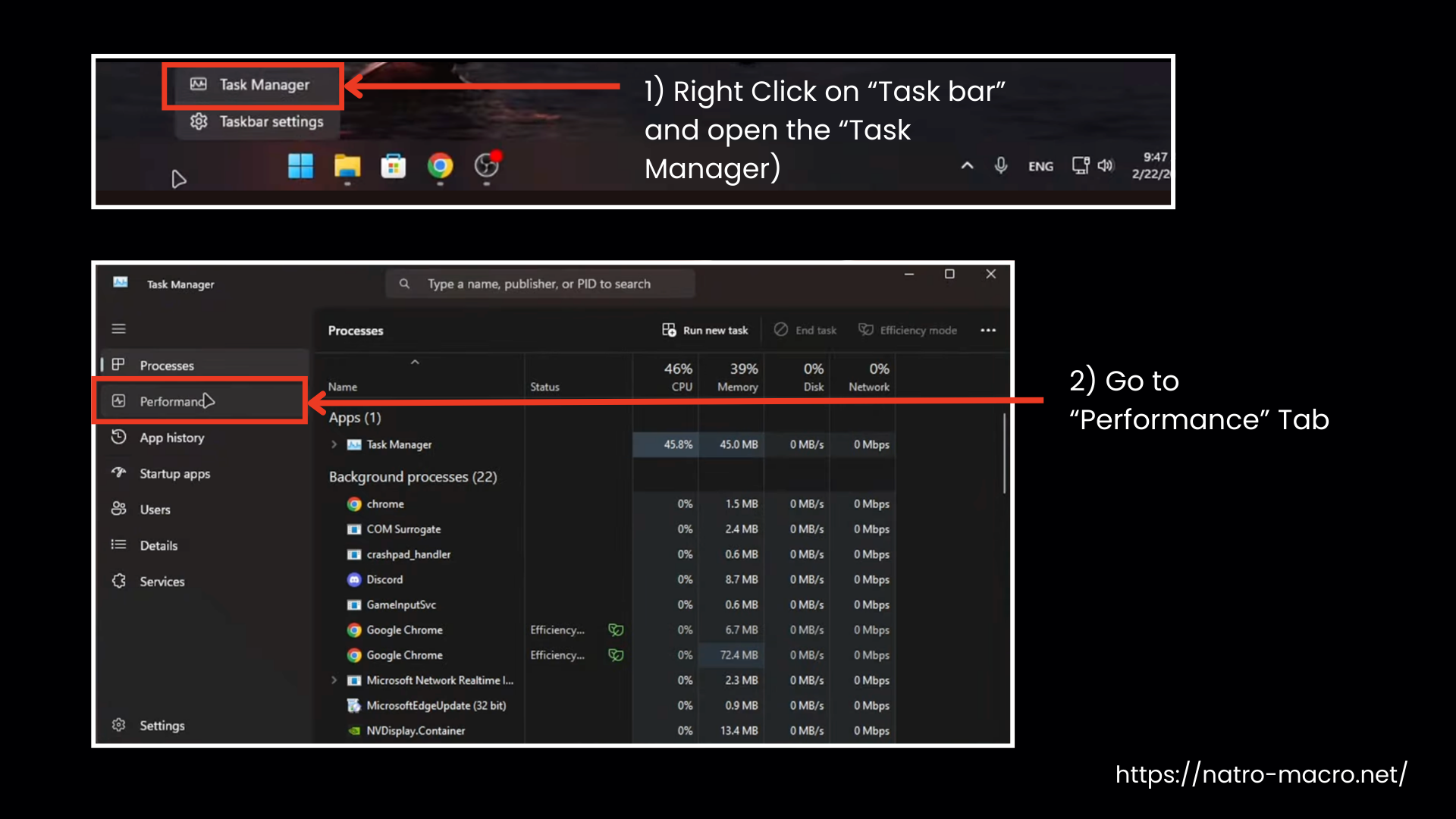
Your PC should have:
- CPU speed of 2.0 GHz or higher
- At least 8 GB RAM
- Any GPU that runs Roblox smoothly


Step 2: Prepare Windows Display and Roblox settings
Right-click on your desktop and open Display Settings. Set:
- Scale to 100%
- Resolution to 1920×1080 or the highest available

Now open Roblox Bee Swarm Simulator. Press Esc and open settings. Set these options:
- Graphics Mode: Manual
- Graphics Level: 1 to 3
- Camera Mode: Classic
- Shift Lock Switch: On
Close Roblox after this.
Step 3: Install AutoHotkey
Natro Macro needs AutoHotkey to run. Download and install AutoHotkey v2.0. Older versions are not supported by newer macro builds. After installation, restart your PC once, and that’s it; you won’t need to use this again.
Note: In Natro Macro v0.9.6 and later releases, AutoHotkey is included (no separate installation needed).

Step 4: Download Natro Macro safely
You can download the latest and safest version from our official website Or:
Option 1: Natro Macro GitHub
The GitHub method is easier. Just:
- Go to Natro Macro GitHub Releases page
- Download the latest ZIP file
- After downloading, you will see a ZIP file in your Downloads folder.

Option 2: Natro Macro Discord
If you choose Discord:
- Join the server
- Complete the verification using Bloxslink
- Authorize your Discord account
- Re-verify to unlock download channels
- Download the latest ZIP file

- It might show that it’s a potentially dangerous file, proceed anyway, as it’s safe.

Step 5: Extract the ZIP File Correctly
Find the downloaded ZIP file. Right-click the ZIP > Extract All > choose “Desktop” or another clear location. Do not open or run files inside the ZIP.

Step 6: Run Natro Macro For The First Time
- After extraction, open the extracted folder and find START.bat or a similar run file like .ahk.
- Double-click it.
- If Windows shows a security message, click More info, then Run anyway.
- Wait a few seconds. A command window will open, followed by the macro interface.
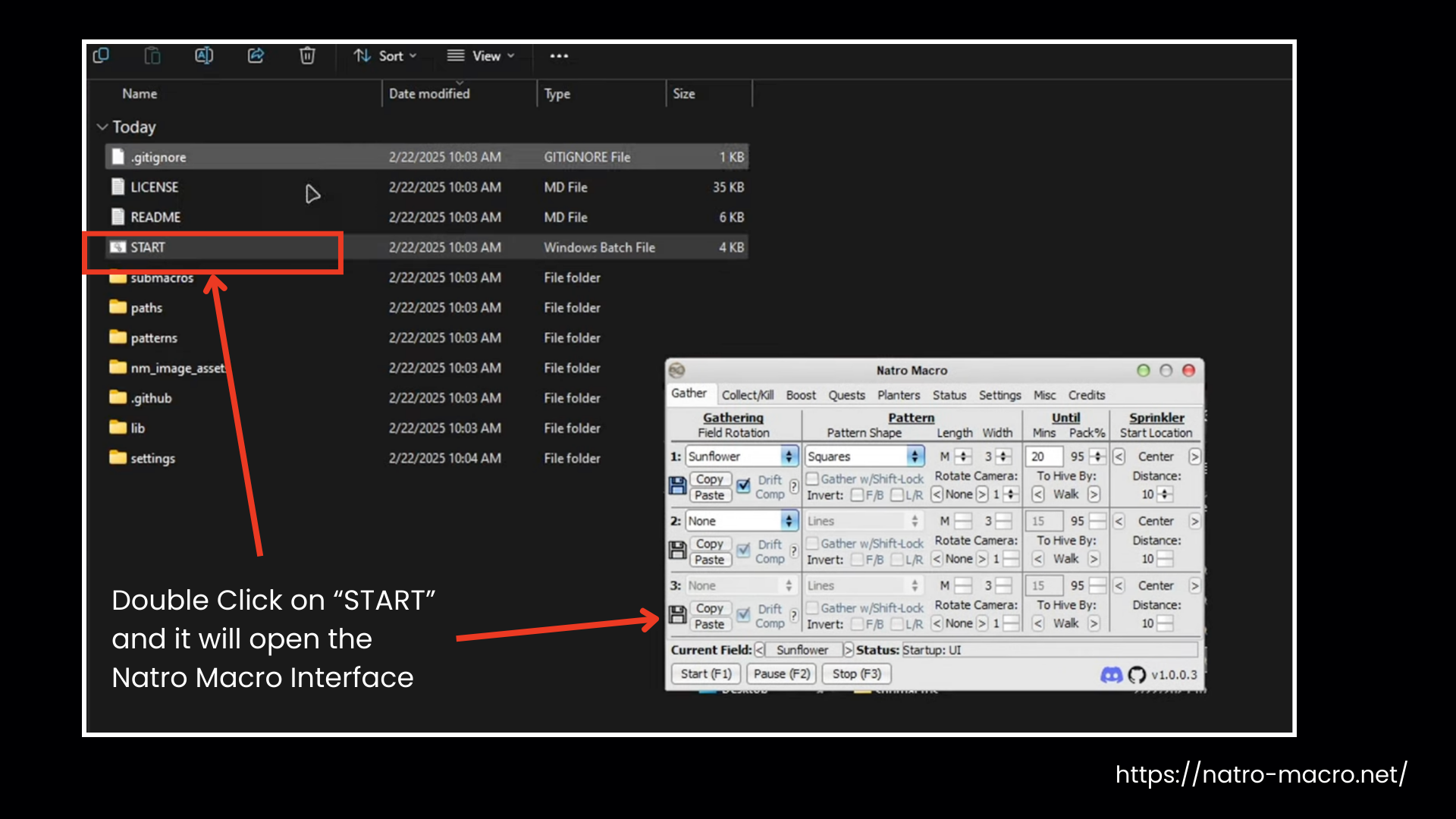
The macro is now installed and ready for farming configuration and quest automation.
Features in Details
Natro Macro BSS handles core game tasks automatically, so your hive stays productive while you focus on progressing and enjoying the game. Here’s a detailed look at Natro Macro’s main features:
Gather Automation
Automatically collects pollen and resources from flowers while you focus on other tasks. You can set how long to gather and which fields to prioritize. Keeps your hive productive, maximizes honey and resource collection, and ensures your character continues farming efficiently without you needing to click constantly.
Collect & Kill
Automatically picks up items and defeats monsters. It collects free resources like Wealth Clock and Glue Dispenser, runs Memory Matches, and farms mobs on timers. You can choose specific enemies or bosses (like Mondo Chick, King Beetle, or Stump Snail). Earn tickets, drops, and materials without stopping honey farming.
Boost Management
Activates boosts like field boosters, stickers, and consumables automatically. Ensure your bees work faster, collect more pollen, and your honey yield increases. Can maintain boosted fields during events or honey farming. Saves resources by managing timing and order of boosts so you get maximum effect without constant supervision.
Quest Automation
It completes NPC quests on automation, including repeatable ones like Black Bear tasks. You can assign which fields to farm and how long to stay. The macro collects rewards and completes objectives while your bees gather honey, letting you progress through quests without tracking them manually.
Planter Management
Manages nectar planting and harvesting automatically. You can set cycles, target nectar levels, and which fields to plant. Keeps your flowers producing continuously, ensures you collect all available nectar efficiently, and lets your hive maintain optimal resources without needing to manually manage each planter.
Hive Tools
It manages and improves your hive using tools like the Gifted Basic Bee auto-hatcher, Bitterberry auto-feeder, and Auto Jelly mutation roller. These features help unlock rare or event bees, gain beneficial mutations, and increase overall bee stats and productivity.
Upgrade Calculators
Built-in calculators help you make smart upgrade choices. You can compare Ticket Shop items, check Supreme Star Amulet (SSA) stat value, and calculate bee bond leveling costs. These tools prevent wasted honey and tickets by showing which upgrades are actually worth buying next.
Macro Tools
Control how your macro runs with customizable hotkeys, startup options, and task management. Choose which fields to gather, when to use balloons or sprinklers, and how tasks switch automatically. These settings keep your gameplay smooth, allowing bees to farm, collect honey, complete quests, and manage planters.
Auto Clicker
The auto-clicker simulates repeated clicks on flowers, bubbles, items, or planters automatically. Saves you from clicking endlessly, ensures constant resource collection, and works alongside other macro features to keep your hive productive. Perfect for long farming sessions, allowing you to gather honey, nectar, and other rewards without manually clicking.
Screenshots




How Does Natro Macro Work?
Natro Macro plays Bee Swarm Simulator the same way a real player would, just on automation. Once set up, it follows movement patterns, switches tasks on timers, reacts to buffs like Haste, and repeats farming cycles without you needing to sit there. You configure it once, then it runs your hive for hours. Here’s how it works:
For full setup, controls, hotkeys, and advanced use, see our complete guide on how to use Natro Macro.
Why Choose Natro Macro?
Natro Macro is the most established macro software for the Bee Swarm Simulator. It handles all core tasks like resource farming, quest completion, bug runs, planter management, and honey conversion without overcomplicating anything. It works reliably on most PCs (Windows only) and can be set up for specific playstyles, including blue hive, red hive, white hive, or mixed hive, letting players get the most out of their account while saving hours of repetitive gameplay. It’s best for:
Here’s a quick comparison with Natro Macro alternatives to find the best BSS macro:
| Feature | Natro Macro (Best Choice) | Revolution Macro | Jitbit Macro | Tadster Macro | BS Macro |
|---|---|---|---|---|---|
| What it does | Auto honey & token farm | Smart honey & token farm | Records clicks & keys | Collects special tokens | Honey & quest farming |
| Setup | Easy, unzip & run | Easy installer, sometimes errors | Hard, need scripts | Hard, need setup | Medium |
| Stability | Works all the time | Can bug sometimes | Can have errors | Works okay | Works most of the time |
| Smart Farming | Picks honey & tokens automatically | Picks best honey & tokens, fights bees well | Not the best | Smart for some tokens | Medium |
| Server Hopping | Limited | Works well automatically | No | Sometimes | Some support |
| Solo Honey Farming | Works very well | Can be faster with AI | Slow | Can be fast | Works okay |
| Special Bees/Tokens | Fights bosses, collects items | AI-powered | No | Great for some tokens | Works okay |
| Low-End PC Friendly | Runs smooth | Can lag | Depends on script | Varies | Varies |
| Compatibility | Only Windows | Windows & macOS | Windows | Windows | Windows |
FAQs
Is Natro Macro safe?
Yes, Natro Macro is safe, free from viruses, and not bannable. Download it directly from our website or GitHub.
Is Natro Macro a virus?
No, Natro Macro is safe for your account. It follows all game rules and passes virus checks reliably. You can check the downloaded file on VirusTotal to verify its safety.
Does Natro Macro work on Mac?
Natro Macro only works on Windows. On Mac, you must use a Windows virtual machine or Bootcamp to run it.
Does Natro Macro work on mobile?
There is no official Natro Macro APK for Android or iOS devices.
Can I customize Natro Macro settings?
Yes, Natro Macro offers customizable settings allowing players to adjust macros and preferences according to their gameplay needs.
How to set up Natro Macro on Discord?
Ensure you have server admin rights, add the Natro Macro bot, and configure settings using the bot’s command channel.
Wrapping Up
Macros have been a core part of Bee Swarm Simulator for a long time, and Natro Macro is the most recognized among them. Trusted by hundreds of thousands of players, it automates tasks like farming, converting at the hive, collecting dispensers, fighting mobs, using boosters, and managing planters. Following precise movement patterns and timed actions, it handles all repetitive tasks efficiently, letting players focus on strategy and goals. Get started with Natro Macro today from the official site and experience hassle-free gameplay.
